For blind and low-vision users · Formats and delivery

Accessible information in the format and delivery path each user chooses.

This user guide explains the choices available after an organization prepares information: accessible format, email or web delivery, and optional Braillia Portal support. Blind and low-vision users can choose HTML, EPUB, eBraille, text, or accessible PDF when appropriate, then use the technology and experience that works for them.

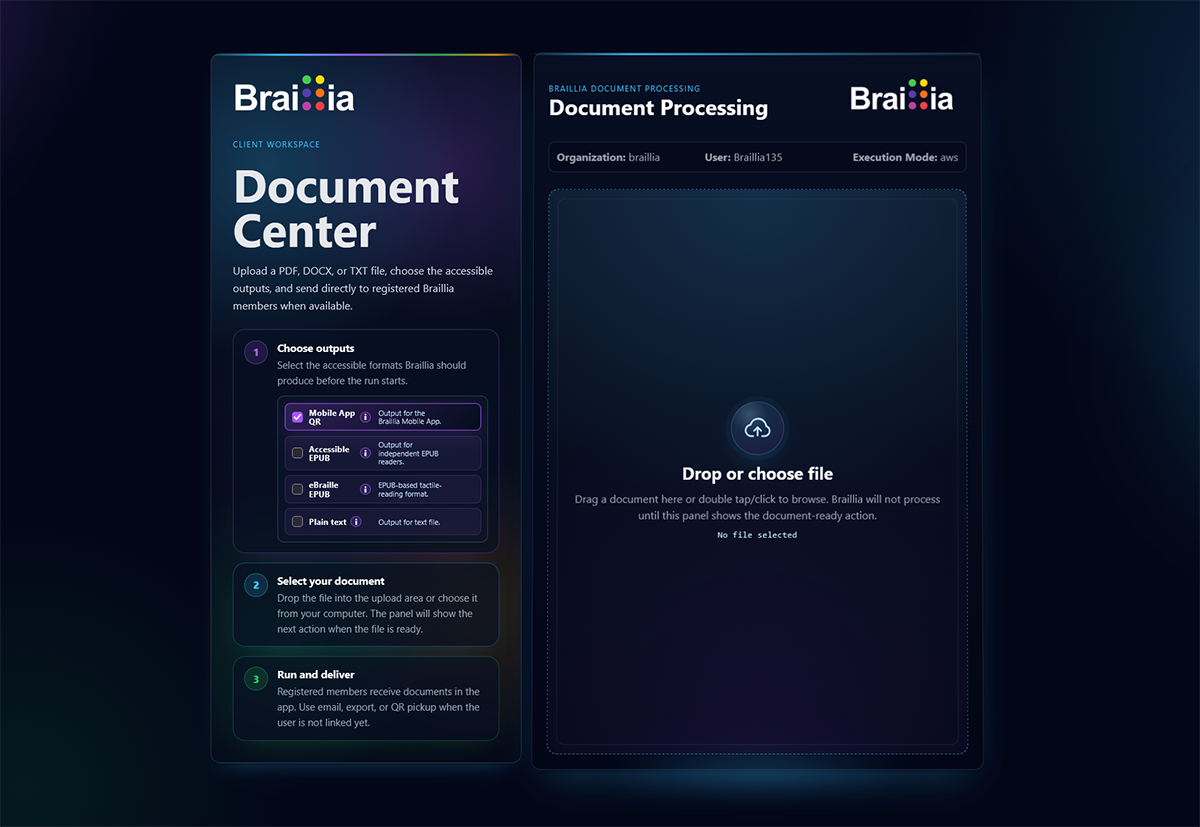
Braillia Document Center showing selectable accessible outputs and a document-processing workspace.
Braillia prepares the accessible output and delivery path each supported workflow and user requires.

Accessible information choices

  • Choose HTML, EPUB, eBraille, text, or accessible PDF when appropriate for the document and user.
  • Receive accessible information by email, through a personal web portal, or in Braillia Portal.
  • Use independent files with familiar browsers, devices, operating systems, and assistive technology.
  • Use the browser-based Portal for the EPUB Reader, Ask Braillia, and Guided Forms where enabled.
Formats and delivery paths
HTMLEPUBeBrailleTextEmailPersonal web portalBraillia Portal

The user chooses the accessible format

Braillia can prepare HTML, EPUB, eBraille, text, and accessible PDF where appropriate. The selected format can match the person’s preference, assistive technology, device, and the way the information will be used.

Delivery fits the moment

Accessible information can go directly to the user by email, appear in a personal web portal, or arrive through Braillia Portal. The organization and user can select the appropriate channel instead of forcing every document into one destination.

Accessible files work independently

HTML, EPUB, eBraille, text, and accessible PDF outputs can be used independently of the Braillia Portal with compatible browsers, readers, operating systems, and assistive technology.

A personal web destination

A personal web portal gives users a private browser-based place to receive and return to available information without requiring a separate installation.

Braillia Portal adds guided support

The browser-based Portal connects prepared documents to the EPUB Reader, Ask Braillia, and Guided Forms where enabled. QR pickup and SMS links provide direct access paths on the person’s phone.

Braillia AI helps turn information into action

In supported Braillia experiences, users can ask document-grounded questions about amounts, dates, instructions, changes, and required next steps, then return to the information when it matters later.

Buyer questions

Get the answers your team needs to move forward.

Government and business teams can begin with one accountable workstream, then expand the operating model only when another accessibility responsibility requires it.

Do users have to use the Braillia Portal to receive an accessible document?

No. Braillia can produce independently usable accessible files and deliver them by email or through a personal web portal. The browser-based Braillia Portal adds guided document navigation, Ask Braillia, and Guided Forms where enabled, without requiring a separate app.

Which accessible formats can users select?

Depending on the source and supported workflow, Braillia can prepare HTML, EPUB, eBraille, text, and accessible PDF. The appropriate choice depends on the user’s preference, device, assistive technology, and intended use.

How can Braillia deliver the selected format?

Braillia can deliver supported accessible information by email, through a personal web portal, by QR pickup or an SMS document link, or through approved direct delivery in Braillia Portal.

Can each user receive a different format or delivery channel?

Yes, when supported by the organization’s configured workflow. Format and delivery can be matched to the user rather than requiring every recipient to use the same file type or application.

What does Braillia Portal add to an accessible file?

Braillia Portal can add structured EPUB reading, audio-supported navigation, Ask Braillia, and Guided Forms in supported workflows. QR pickup and SMS links open the Portal in the recipient’s mobile browser.

Give each user accessible information in the format and channel that works for them.

Review one document workflow with Braillia and define the formats, delivery channels, privacy requirements, and guided support your users need.

Review an Accessible Information Workflow