

Real product captures
Review current Braillia interfaces and workflow states rather than generic accessibility illustrations.

Braillia product overview
Review how Braillia assesses website barriers, processes inaccessible documents, creates accessible outputs, supports visitors inside approved websites, and connects information to secure delivery and existing systems before starting a sales conversation.
Review current Braillia interfaces and workflow states rather than generic accessibility illustrations.
Run the live Accessibility Health Report and review findings produced through the Braillia remediation workflow.
See what works independently, what connects to Braillia delivery, and what requires a scoped integration.
Evidence register
Start with a live diagnostic, current product states, the platform trust model, or the implementation path. Each resource answers a specific approval question and leads to the next piece of evidence.
Live diagnostic
Review real rule-based findings from an authorized website sample and see how they inform a fuller accessibility path.
What it verifies: Detection, prioritization, user impact, issue reach, and the path into a complete review.
Guided product proof
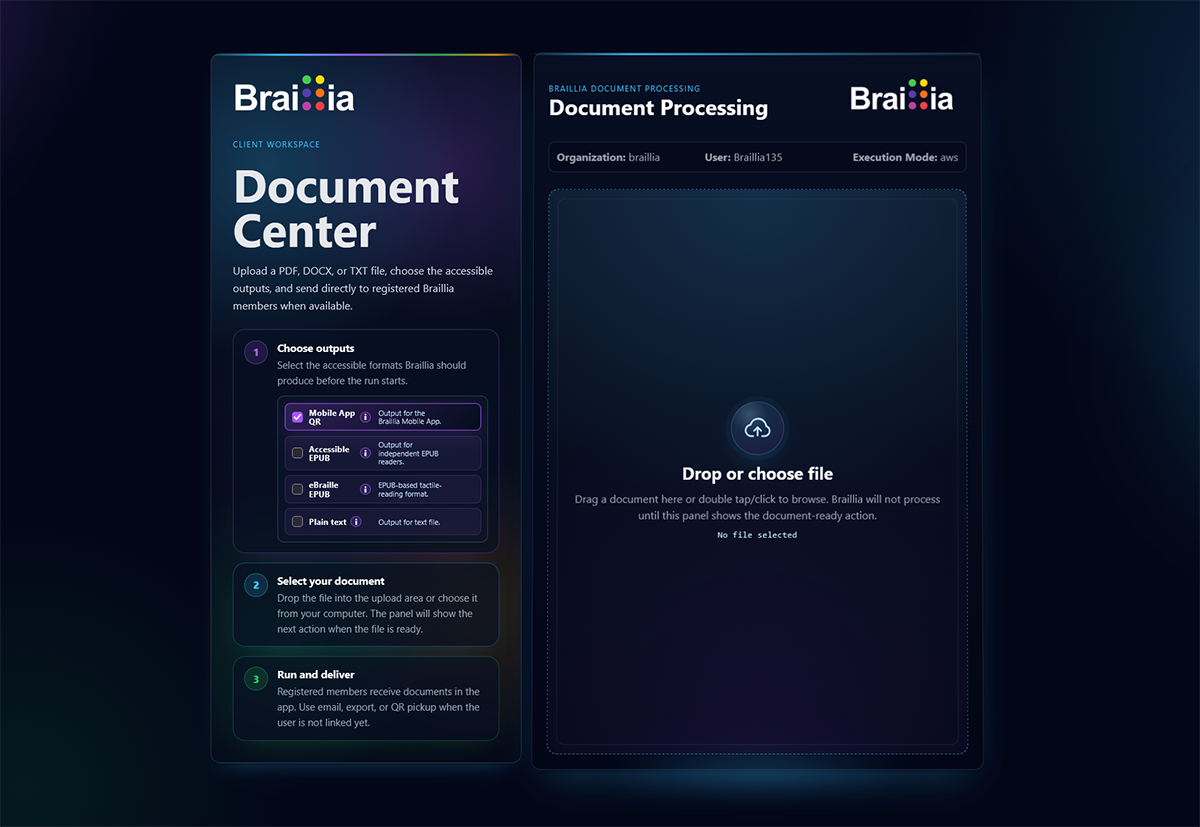
Review current product states for source intake, processing, output selection, and remediation evidence, then see what an authorized source-specific sample adds.
What it verifies: The visible workflow and the evidence boundaries required to evaluate independent outputs and optional Braillia-supported use.
Output evaluation
Compare where HTML, EPUB, eBraille, TXT, accessible PDF, and optional Braillia guided access fit, including the structure and behavior reviewers should inspect.
What it verifies: Whether the selected output can support the person, technology, system, and task the workflow requires.
Product journey
Follow the workflow from document processing through QR pickup or SMS document links to Portal access and guided document use.
What it verifies: How prepared information can move from the organization workflow to recipient access, understanding, and action.
Product capability
Review the on-page experience, user-controlled tools, approved-site model, and Portal-managed configuration.
What it verifies: How visitors can adjust, read, hear, navigate, and ask for help without leaving the approved website.
Trust review
Review public security principles, protected-processing boundaries, access patterns, retention posture, and review topics.
What it verifies: Whether Braillia is ready for the organization's deeper security, privacy, and procurement evaluation.
Approval path
See how accessibility, operations, IT, security, and procurement can evaluate one shared first workflow.
What it verifies: Scope, user outcome, product fit, system boundaries, ownership, evidence, and the approval sequence.
See Braillia at work
Choose the website, document, delivery, or system problem your team can act on now. Braillia provides the capability to solve it and a path to connect the rest of the accessibility workflow as your needs grow.
Remediate and transform
Braillia processes complex source material into structured accessible information while keeping the output and validation workflow connected.
Help the internal decision move
Give executives, accessibility leaders, IT, security, and procurement a clear document for the question they own, without asking one internal champion to rebuild the Braillia case from scattered pages.
Open Buyer Resource LibraryEvidence for every reviewer
Accessibility purchases rarely belong to one team. Braillia connects product evidence to the operational, technical, security, and procurement questions that determine whether a workflow can move into implementation.
Accessibility leaders
Live website snapshot, remediation workflow, document structure, outputs, and validation approach.
Review Remediation EvidenceProduct and operations
Document Center, independent outputs, direct delivery, QR pickup and SMS text delivery, embedded website support, and mobile use.
Watch the TransformationIT and security
Platform operating model, API boundaries, approved websites, organization controls, privacy, and security readiness.
Review Security and ArchitectureExecutive and procurement
Relevant workflow, organizational consequence, implementation path, security review, and procurement context.
Review Implementation ReadinessEvidence boundary
The public site shows current product states and working access paths. A scoped review adds the organization's actual source, requirements, systems, and approval boundaries while protecting private customer information as marketing material.
Bring the source and the outcome your users need. Braillia will define the required outputs, delivery path, system boundaries, and evidence your organization can evaluate.