Government accessibility solutions

Accessible public communication for residents, applicants, and communities.

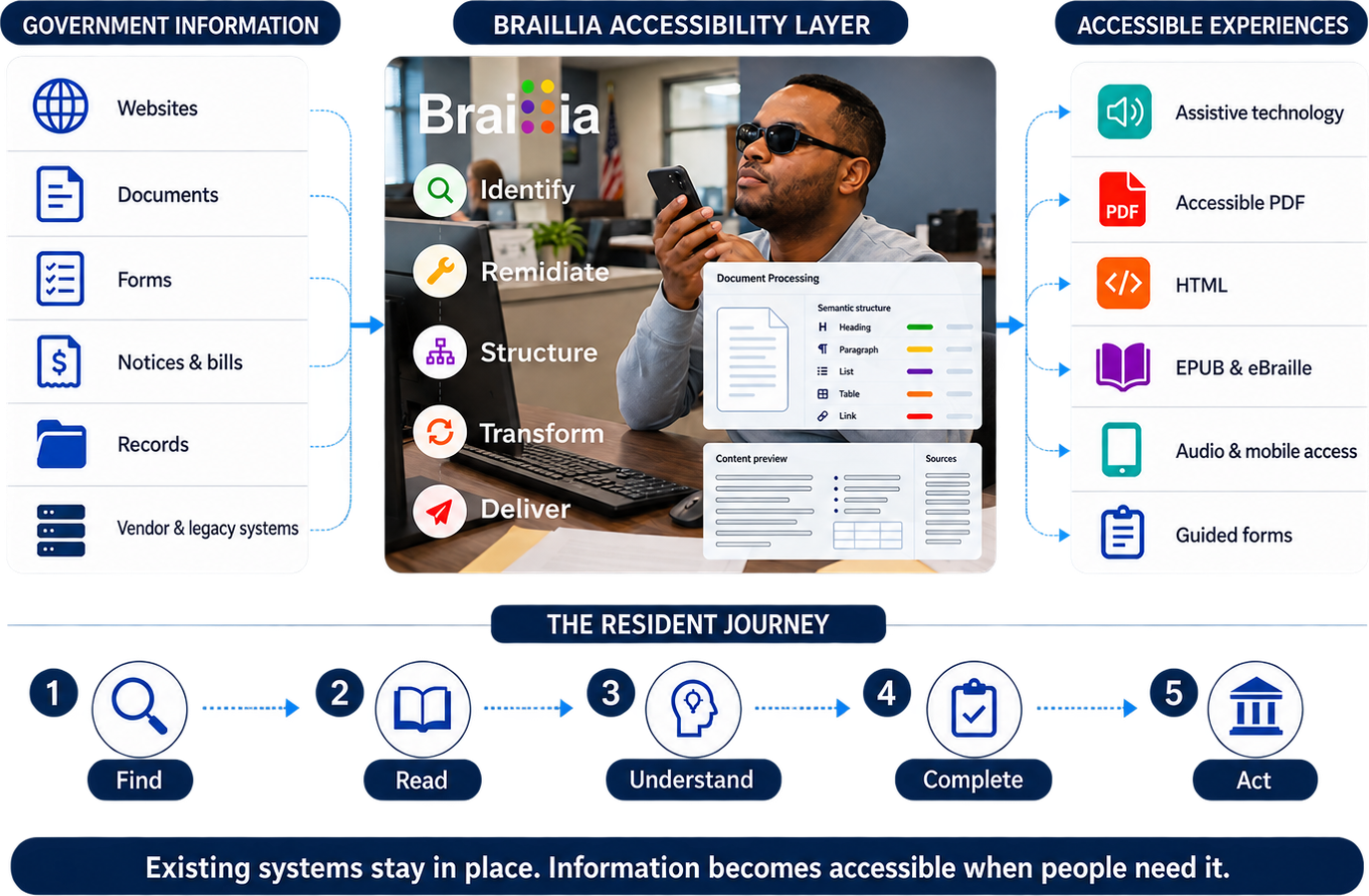
Braillia helps government teams find accessibility barriers across websites and documents, transform critical information such as benefits letters, public notices, agency forms into structured accessible outputs, and add embedded website support or secure delivery when the workflow requires it.

Government access path

  • Assess websites, PDFs, forms, documents, and critical service workflows.
  • Transform inaccessible source material into structured outputs people and assistive technology can use.
  • Add embedded website support, direct delivery, QR access, mobile guidance, and Braillia AI where the workflow needs them.
  • Work alongside existing systems and begin with one high-consequence access problem.
Ways Braillia can help
Website accessDocument processingAccessible outputsSecure deliveryEmbedded supportIntegration

Critical access moment

When inaccessible information blocks a decision, people and service teams absorb the consequence.

A benefits letter, hearing notice, public deadline, or required form can affect services, housing, transportation, voting, and daily independence.

Benefits letters

Public notices

Agency forms

Eligibility packets

Hearing notices

Service updates

Where Braillia fits

Put accessibility where the information can actually change.

Public agencies own the duty to provide usable access, but the website, case system, benefits platform, forms product, or document-generation vendor may control the technology. Braillia can begin with agency-owned information and extend through the vendor or integrator when the service platform controls the workflow.

Agency-controlled public information

Start with notices, forms, and services the agency can change now.

Department-created notices, applications, public documents, correspondence, and service instructions can establish a practical first accessibility workflow.

Workflow control
Program operations, digital services, communications, records, ADA, and Section 508 teams
Braillia's role
Assess the access path, transform the information, create usable outputs, and preserve evidence of the work.
Review Document Transformation

Vendor or integrator-controlled service

Extend accessibility inside the platform residents already use.

When a case-management, benefits, licensing, permitting, court, or constituent-services platform owns the experience, Braillia can be evaluated with the vendor or systems integrator.

Workflow control
Digital service vendors, systems integrators, platform product owners, and agency enterprise applications teams
Braillia's role
Add accessible outputs, embedded visitor support, or an approved integration around the existing service.
Review Integration Paths

Legacy records and correspondence

Open access to years of public information without replacing the source system.

Historical documents, batch correspondence, archives, and long-lived government systems often need a scalable transformation path rather than file-by-file remediation.

Workflow control
Records, archives, enterprise architecture, document services, and modernization teams
Braillia's role
Create a source-specific accessibility layer that turns approved legacy information into modern accessible formats and delivery paths.
Explore Legacy Accessibility

Bring the decision owners together

  • ADA or Section 508 leadership
  • Program and constituent-service operations
  • Digital services and communications
  • Enterprise applications and security
  • Procurement, legal, and the incumbent technology provider

Act when these signals appear

  • A resident can't complete a required public service independently
  • Benefits, hearing, eligibility, or response deadlines are difficult to find or understand
  • Departments rely on manual alternate-format fulfillment
  • A modernization project creates a funded window to add accessibility at the information layer

Best first move

Select one high-volume notice, public form, or deadline-driven service and identify whether the agency or its technology provider controls the information path.

Choose the starting point

Start with the website, document, or service barrier your team can fix now.

Begin with a website, a critical document workflow, or information produced by an existing system. Braillia shapes the starting path around that need, then connects additional capabilities as the accessibility program grows.

Website and digital service access

Find accessibility barriers across government websites, forms, PDFs, and public digital tasks before users encounter them.

Check a Website

Critical documents and communications

Transform benefits letters and public notices into structured accessible outputs people and assistive technology can use.

Watch Document Transformation

Recurring and system-generated information

Connect existing document and communication systems to repeatable transformation, validation, and delivery workflows while preserving the source platform.

Review Integration Paths

What users need

Give blind and low-vision users information they can understand and act on.

Braillia is designed around real information tasks: finding what changed, understanding what is due, asking questions, saving the accessible document, setting reminders, and acting with confidence.

Understand required action

Find dates and deadlines

Review forms independently

Ask what a notice means

Save official communication

Return to important documents

How Braillia helps

Match each barrier to the repair, format, and delivery path people need.

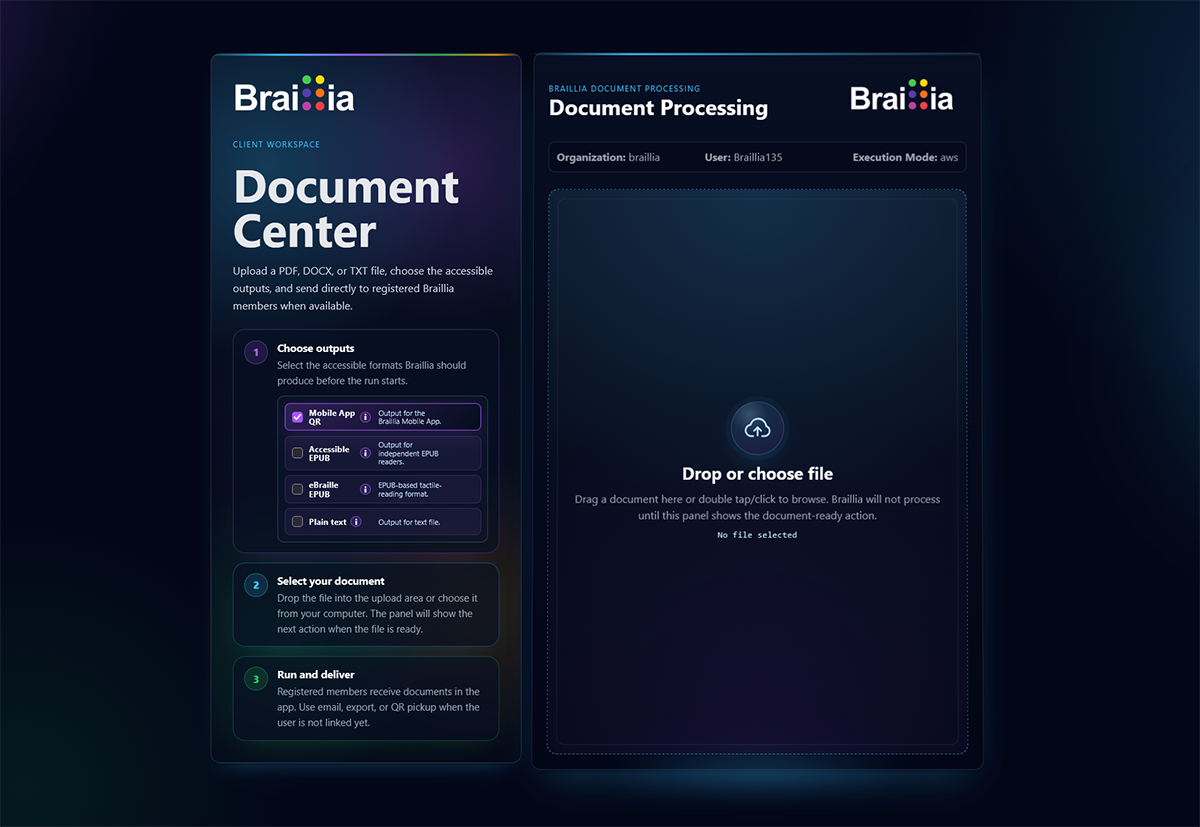
Braillia can assess and remediate digital content, reconstruct documents into accessible outputs, add support inside approved websites, and connect critical information to secure delivery and guided use. Each capability can stand alone or work as part of a connected accessibility workflow.

Document remediation

Direct delivery and QR setup

Voice-guided mobile documents

Braillia AI Personal Assistant

Guided reminders

Organization messages

Organization value

Give accessibility, operations, and IT teams one shared path from issue to outcome.

Connect remediation with agency delivery
Support ADA and Section 508 programs
Improve public access outcomes
Reduce fragmented alternate-format workflows
Scale accessible communication across departments
Review Security and Procurement Readiness

Start here

Start where delayed access creates the greatest human and operational consequence.

Start with a high-volume notice, benefits packet, or public form where misunderstanding creates service delays.

Review This Workflow

Buyer questions

Get the answers your team needs to move forward.

Braillia helps organizations assess barriers, remediate critical information, deliver usable access, and scale the operating model around it.

How can Braillia support government communication?

Braillia helps government teams find accessibility barriers across websites and documents, transform critical information such as benefits letters, public notices, agency forms into structured accessible outputs, and add embedded website support or secure delivery when the workflow requires it.

Where should an organization start?

Start with a high-volume notice, benefits packet, or public form where misunderstanding creates service delays.

Does Braillia replace existing systems?

Braillia works alongside existing websites, document systems, portals, operational platforms, and accessibility partners. Organizations can begin with assessment, document processing, embedded website support, Portal workflows, or a scoped API connection based on the access outcome they need to create.

Start with one government access moment that carries real consequence.

Start with a high-volume notice, benefits packet, or public form where misunderstanding creates service delays.

Review a Government Workflow