
Documents
Receive remediated and delivery-ready documents, save them, revisit them, and understand them in one guided mobile experience.
Braillia Mobile Experience
Braillia is the voice-guided mobile outcome of the full Braillia accessibility workflow, designed for blind and low-vision users to independently receive, understand, navigate, and act on important information in everyday life.

Remediated documents, direct deliveries, QR setup and pickup, notices, reminders, printed text, messages, healthcare information, billing communication, labels, and real-world accessibility tools come together inside one guided accessibility-first platform designed around calm usability, confidence, and independence.

Voice-guided mobile access
Remediated documents, secure deliveries, QR setup and pickup, messages, reminders, statements, Braillia AI, and low-vision tools come together in one guided mobile experience.
Voice is the connective layer that makes Braillia feel immediate, navigable, and personal. Through spoken prompts, predictable navigation, touch-to-speak reading, and the Braillia AI Personal Assistant, users can move through critical information naturally through a voice-guided interface.
The app universe
Braillia is the user experience around the full access path, where users can receive, scan, ask, organize, remember, pay when supported, and act.
Receive remediated and delivery-ready documents, save them, revisit them, and understand them in one guided mobile experience.
Get accessible organization communication connected to the same delivery path as documents, notices, and reminders.
Track payment dates, appointments, follow-ups, deadlines, and next steps.
Use direct delivery, secure QR setup and pickup, barcode, printed text, and AI image guidance to turn prepared and real-world information into usable access.
Ask natural questions, surface important details, identify deadlines, and create clearer action paths.
Use zoom, contrast, viewing modes, flashlight support, and camera tools for different vision needs.
When supported bills are delivered, users can move from understanding what is due toward payment action.
Use supported beacon zones to connect physical spaces to accessible mobile guidance.
Complexity made simple
Braillia combines prepared content, Ask Braillia voice commands, dynamic touch interaction, spoken prompts, and predictable navigation so users can move through detailed information with confidence in seconds.
A simpler starting point for everything important.
Braillia Options is the central home screen of the app, giving users one consistent place to reach delivered documents, messages, reminders, scanning tools, accessibility settings, assistance features, and Braillia Personal Assistant.
Predictable guidance shows users what is available, supports confident movement through the app, and provides a reliable path home.
Details
Most mobile experiences assume users can visually search through menus, icons, hidden navigation, and changing layouts.
For blind and low-vision users, that often creates frustration before the experience even begins.
Braillia Options was designed to feel different.
Braillia creates one calm, predictable starting point where users can reach delivered documents, messages, reminders, reading tools, accessibility settings, and Braillia Personal Assistant from one consistent home screen.
The experience is intentionally structured around orientation and confidence.
Users are guided through what is available. They move through the app using predictable controls. They always know how to return home safely.
Braillia Options is the foundation for a guided accessibility experience built around orientation, clarity, and control.
For many users, accessibility frustration begins when apps become visually overwhelming. Braillia was built around the idea that accessibility should feel calm, understandable, and dependable from the very first interaction.
The goal is simple: help users always know where they are, what is available, and what to do next.
Instantly access important information.
Braillia Scan transforms a simple camera scan into immediate access to remediated documents, prepared notices, supported product information, and AI image guidance.
A healthcare instruction, utility bill, public notice, or product package can become something users can review, understand, discuss, and act on independently within seconds after it is prepared or connected through Braillia.
Because accessibility matters most when information is time-sensitive.
Details
A utility bill. A hospital discharge instruction. A government notice. A product package.
In most situations, a QR code or barcode is just another visual interaction.
Braillia transforms scanning into accessible understanding.
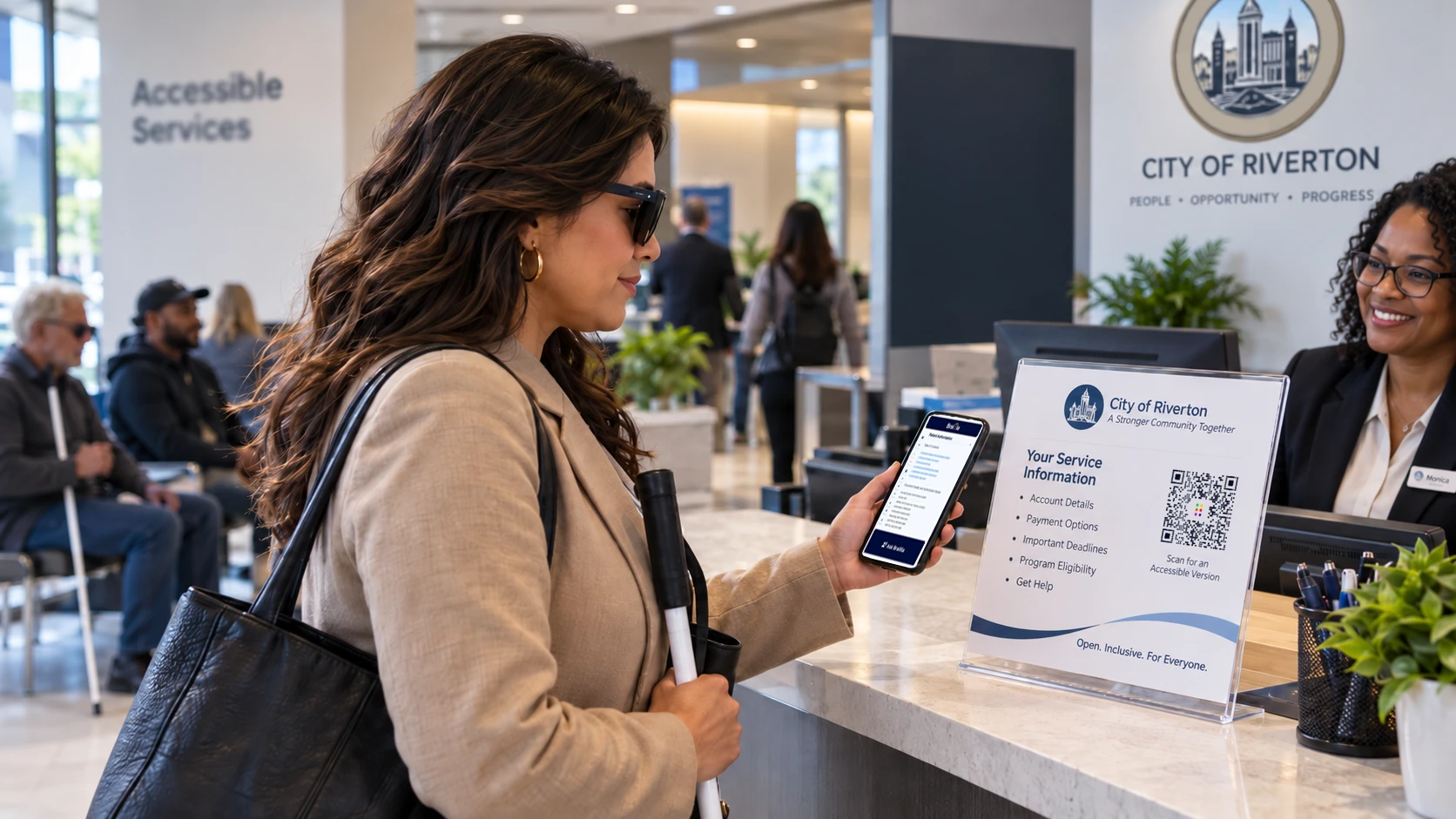
Braillia Scan allows new or unconnected users to scan secure Braillia QR codes, complete setup when needed, and retrieve remediated, structured, or prepared document and communication experiences directly inside the Braillia mobile app.
Users can independently access prepared information in real time through a connected remediation and delivery path.
The experience is designed around urgency.
Critical information often arrives with deadlines, consequences, and real-world impact. Information affecting healthcare, finances, services, or personal independence deserves immediate accessible delivery.
Braillia direct delivery and QR setup carry prepared accessible content into immediate mobile accessibility experiences.
Users can:
The scanner also supports product barcode lookup experiences.
Users can review supported product details such as:
Because accessibility extends beyond documents. It should extend into everyday life.
Braillia AI image guidance also helps users ask what is in front of them.
Users can use Braillia Scan to support scene recognition for:
Braillia combines text and code capture with visual descriptions that help users understand their surroundings and decide what to do next.
Braillia Scan transforms visual information into something blind and low-vision users can understand and use immediately.
Keep important information accessible and organized.
Braillia Documents creates a trusted accessible library for remediated bills, prepared notices, medical documents, personal records, and important communication delivered through Braillia.
One guided accessible library keeps important information available across deliveries, downloads, and everyday communication so users can return to it anytime.
Details
Blind and low-vision users are often forced to depend on:
Important information can quickly become difficult to relocate or impossible to navigate independently.
Braillia Documents creates a trusted accessible library designed specifically around blind and low-vision usability.
Bills, healthcare information, notices, personal records, service communication, and remediated accessible documents remain organized inside one guided accessibility-first experience.
Accessible information remains available so users can return whenever they need it.
Documents become interactive accessibility experiences that stay connected to their remediation and delivery path.
Users can:
The experience is designed around confidence.
Braillia gives users a dependable place to return to important information across changing emails, websites, and delivery systems.
Braillia Documents creates continuity.
A trusted accessible place where information remains understandable, reachable, and usable when users need it most.
Because accessibility should remain available after the first interaction.
Read documents with confidence and clarity.
Braillia Document Reader transforms complex layouts and visual documents into guided touch-and-audio experiences users can explore naturally.
Users can review sections with audio support, move through content, pause, return later, and interact through a guided document structure.
The goal is confident understanding.
Details
Traditional documents are usually built around:
Even when documents technically pass accessibility validation, the real-world reading experience can still feel exhausting, confusing, and difficult to navigate independently.
Braillia Document Reader was built differently.
Braillia transforms prepared documents into guided touch-and-audio experiences designed around blind and low-vision usability.
Users can:
The experience is designed to reduce overwhelm.
Users interact with information through a guided, conversational, and understandable experience.
Braillia focuses on helping users:
Because accessible documents should feel structured, guided, and usable.
It should feel like understanding information.
Get answers when information feels overwhelming.
Braillia Personal Assistant turns accessibility into conversation.
Users can ask natural questions to reach one important detail quickly:
Braillia AI helps users quickly find important information, understand what matters, and move forward more confidently.
Details
Most documents force users to search line by line for important information hidden inside dense layouts, long paragraphs, or inaccessible formatting.
A healthcare notice may contain one important instruction buried inside multiple pages. A billing statement may hide a deadline deep inside inaccessible formatting. A government letter may require finding one specific detail inside overwhelming language.
Braillia Personal Assistant changes accessibility from passive reading into conversation.
Users can ask natural questions to reach relevant information quickly:
Braillia AI helps:
The experience is designed around independent understanding.
Users gain a direct path to understand important information and decide what to do next independently.
Braillia Personal Assistant creates a more natural accessibility experience where information becomes understandable, searchable, and conversational.
The goal is confident understanding of what matters.
Keep important communication within reach.
Braillia Messages gives blind and low-vision users a trusted accessible inbox for healthcare communication, service updates, billing notices, organization messages, appointment alerts, and time-sensitive information.
Users receive guided accessible communication designed for independent understanding and action.
Details
Important notices are often buried inside:
Braillia Messages creates a trusted accessible inbox for:
Users receive guided communication experiences designed around independent understanding and action.
Messages become:
Braillia AI can help users:
The experience is built around trust.
Users approve which organizations can communicate with them. Messages are designed to feel purposeful, relevant, and easy to understand.
Accessibility includes receiving information and understanding what to do next.
Accessibility built around trust and control.
Organization Requests allows users to review and approve which organizations can send documents and messages through Braillia.
Users stay in control of who can communicate with them, creating a trusted and intentional accessibility experience.
Details
Blind and low-vision users stay in control of who can communicate with them.
Braillia Organization Requests allows users to review and approve organizations before ongoing messages or document delivery begins.
Healthcare providers, utilities, agencies, service organizations, nonprofits, and connected organizations can request permission to send:
Users stay in control of who is allowed into their accessibility experience.
The goal is trusted communication.
Braillia creates an intentional accessibility ecosystem where users understand:
Trust is essential in accessibility.
Especially when communication involves:
Braillia is designed to empower users and preserve their control.
Stay ahead of important deadlines.
Braillia Reminders helps users stay ahead of utility bills, healthcare appointments, follow-ups, payment deadlines, service notices, and other time-sensitive information connected to documents and messages.
Braillia becomes more than a reader. It becomes a support system for real-world action and daily independence.
Details
Important dates are often buried inside inaccessible documents, confusing communication, and difficult layouts.
A missed utility payment. A healthcare follow-up. A service deadline. A benefits appointment. A billing notice.
Braillia Reminders helps users identify, organize, and stay ahead of time-sensitive information connected to messages, delivered documents, and Braillia AI-assisted understanding.
Reminder support keeps important commitments organized around:
Braillia can help surface:
The experience is designed around reducing stress.
Timely accessible reminders help users understand critical information and act before deadlines pass.
Braillia becomes more than a reader. It becomes a support system helping users stay connected to the information life depends on.
Because accessibility should support both access and action.
Read printed information independently.
Braillia Snapshot Reader helps users understand printed mail, labels, forms, instructions, notices, cards, packaging, and everyday paperwork through guided camera capture and spoken accessibility support.
Braillia turns captured text into understanding and a clear next action.
Details
Printed mail, forms, labels, instructions, packaging, notices, cards, and everyday paperwork still create major accessibility barriers for blind and low-vision users.
Most systems simply read raw OCR text aloud.
Braillia was designed differently.
Braillia Snapshot Reader transforms camera capture into guided spoken understanding.
Braillia organizes captured text around the details users need to understand:
Users can capture:
Braillia AI helps structure and explain the information in a more understandable way.
The experience is designed to reduce confusion and improve confidence during real-world situations where printed information still dominates everyday life.
Because accessibility extends beyond digital files. It should extend into the physical world around the user.
Accessibility designed for different levels of vision.
Low Vision Assist provides zoom, contrast enhancement, flashlight support, viewing modes, and camera tools designed for users who rely on partial vision in everyday situations.
Braillia supports different ways people interact with the world around them and lets each user shape the experience around their vision.
Details
Low vision includes a wide range of experiences and preferences.
Some users need stronger contrast. Others need magnification. Others need glare reduction, edge definition, brightness control, or different viewing modes depending on lighting conditions and visual fatigue.
Low Vision Assist adapts to the user through flexible viewing controls and preferences.
Braillia provides camera enhancement tools designed to help users interact with the world more comfortably using the vision they have.
Users can:
Different filters help users:
The experience is designed around comfort, confidence, and visual independence.
Because low-vision accessibility should support the vision each person uses.
Braillia supports different ways people see, navigate, and interact with information throughout everyday life.
The goal is simple: help users interact with the world more confidently using the vision they have.
Location-aware guidance in supported spaces.
BLE Braillia Guide helps blind and low-vision users receive location-aware guidance, spoken prompts, and accessible actions when they are near supported Braillia beacon zones.
Location-aware guidance connects users to service counters, pickup areas, entrances, departments, and accessible information points.
Details
Many real-world environments still depend on visual signs, counters, room labels, printed instructions, or staff direction.
For blind and low-vision users, that can make it difficult to know where they are, what service area they are near, or what action is available in that moment.
BLE Braillia Guide connects supported physical spaces to accessible mobile guidance.
When a user is near a Braillia-supported beacon zone, the app can receive location-aware information such as:
The beacon connects the supported location to the full Braillia experience.
Braillia Network stores the accessible guidance, display text, and supported actions in the organization’s portal environment, so a physical location can connect to a guided mobile accessibility experience.
BLE Braillia Guide can support moments such as:
The goal is orientation, confidence, and timely access to the right information in the right place.
Shop and identify products more confidently.
Braillia can identify supported products and read important information such as product names, ingredients, allergens, quantity, and nutrition details aloud.
For users, this helps transform shopping, cooking, and household tasks into more independent experiences.
Details
Everyday shopping and household tasks often depend heavily on visual packaging and printed labels.
Braillia helps users identify supported products and hear important information such as:
Users gain independent access to supported product and packaging information in everyday life.
The experience is designed around practical independence.
Cooking. Shopping. Organizing household items. Checking allergens. Understanding packaging.
Accessibility extends into everyday information and action. It should support real-world living.
Accessibility that feels personal.
Personal Setup allows users to manage preferences like their preferred name and language so the app feels more natural, welcoming, and respectful.
Braillia supports both the person and the accessibility workflows serving them.
Details
Accessibility should adapt to the person using it.
Personal Setup allows users to personalize parts of the Braillia experience such as:
Personal configuration creates comfort, respect, and familiarity.
Braillia was designed around the understanding that accessibility experiences become more trusted when they feel personal and human.
The platform should feel personal, welcoming, and human. It should feel welcoming, understandable, and designed around the person using it.
Because accessibility is personal.
Guided setup built for blind and low-vision users.
Braillia Setup helps users safely navigate permissions, alerts, microphone access, camera access, and connection settings with guided explanations before Android system prompts appear.
Guided setup explains what is happening, why each permission matters, and what the user can expect next.
Details
Many accessibility barriers begin before an app is even fully configured.
Silent permission prompts. Confusing Android dialogs. Unclear setup requirements. Visual-first onboarding.
Braillia Setup was designed to guide users safely through:
using spoken explanations and accessibility-first guidance before Android system prompts appear.
Guided setup clearly explains:
The experience is designed around reducing setup anxiety and helping users feel supported from the very beginning.
Because accessibility should support the user from the first interaction.
Adjust the experience around your vision.
Braillia allows users to personalize contrast modes, text size, and visual presentation based on their comfort and accessibility needs.
Accessibility should adapt to each user and the way they interact with the system.
Details
Different users experience vision differently throughout the day, under different lighting conditions, and across different environments.
Braillia allows users to personalize:
based on what feels most comfortable and easiest to see.
Some users may prefer:
The experience is designed around flexibility.
Accessibility should give users control over a flexible visual experience.
Braillia adapts around the user, helping create calmer, clearer, and more comfortable interaction experiences across the platform.
Because accessibility should support the way people naturally interact with information.
Built with real user feedback.
Braillia Suggestions gives users a direct voice in the future of the platform.
If something feels confusing, frustrating, missing, or could work better, users can send suggestions directly so Braillia continues improving around real accessibility experiences and everyday usability.
Details
The best accessibility systems are shaped by the people who actually use them.
Braillia Suggestions gives users a direct voice in improving the platform by sharing:
Braillia continues evolving around lived accessibility experience and direct user feedback.
The platform is designed to improve through:
Because accessibility should grow with the people it serves.
Guidance when users need it.
The Help Center explains Braillia features, navigation, and app experiences in accessible language designed for blind and low-vision users.
Users can learn the platform, explore features, and regain orientation independently.
Details
Learning Braillia should support independent exploration from the beginning.
The Help Center explains:
using guided language designed specifically around blind and low-vision usability.
Users can:
with confidence and independence.
The experience is designed around reassurance.
Confidence begins with understanding.
Accessibility should feel guided and calm.
Braillia combines guided audio support, large touch targets, predictable layouts, and safe interaction patterns so users know what is on the screen and what to do next.
Users can safely explore the app, hear what actions are available, and decide confidently before activating controls.
That reduces stress, confusion, and fear of making mistakes.
Details
Most mobile experiences still rely heavily on visual discovery and trial-and-error interaction.
Braillia was designed around:
Users always understand:
Braillia supports safe exploration.
Users can touch controls, hear what they do, and decide confidently before activating actions.
That reduces:
The goal is confident, independent use.
Predictable movement through the app.
Braillia supports guided swipe navigation between major areas of the app, creating a natural and reliable way to move between experiences through predictable controls.
Consistency creates confidence.
Details
Braillia supports guided swipe navigation between major areas of the app, creating a natural and reliable way to move between experiences through predictable controls.
Consistency creates confidence.
Always know how to get back.
Braillia includes a consistent Back, Home, and Forward navigation system throughout the app so users always have a reliable path back to safety and orientation.
The Braillia logo acts as the Home button, giving users a trusted reset point anywhere inside the experience.
Details
Braillia includes a consistent Back, Home, and Forward navigation system throughout the app so users always have a reliable path back to safety and orientation.
The Braillia logo acts as the Home button, giving users a trusted reset point anywhere inside the experience.
Accessibility built into the experience from the beginning.
Braillia allows approved organizations to securely deliver remediated documents, prepared notices, reminders, and communication directly into the Braillia mobile experience.
Users receive prepared information in a format designed around independent understanding from the start.
Details
Braillia allows approved organizations to securely deliver remediated documents, prepared notices, reminders, and communication directly into the Braillia mobile experience.
Users receive prepared information in a format designed around independent understanding from the start.
Accessibility only matters if people can actually use the information.
A document may technically validate while still leaving blind and low-vision users struggling to understand what matters, what changed, what is due, or what action to take next.
Braillia transforms remediated, prepared, or operational information into on-demand, guided accessibility experiences designed for independent understanding and real-world action.
The larger goal is simple: help users know what they have, understand what it means, and decide what to do next independently.
Details
A document may technically validate while still leaving blind and low-vision users struggling to understand what matters, what changed, what is due, or what action to take next.
Braillia transforms remediated, prepared, or operational information into on-demand, guided accessibility experiences designed for independent understanding and real-world action.
The larger goal is simple: help users know what they have, understand what it means, and decide what to do next independently.
Braillia can map one organization workflow into the app experience: remediation, secure direct delivery, QR setup and pickup, documents, messages, reminders, scan, Braillia AI, and next-step action.