
Person
A student or family must understand the information and act before an educational opportunity, service, or deadline is missed.
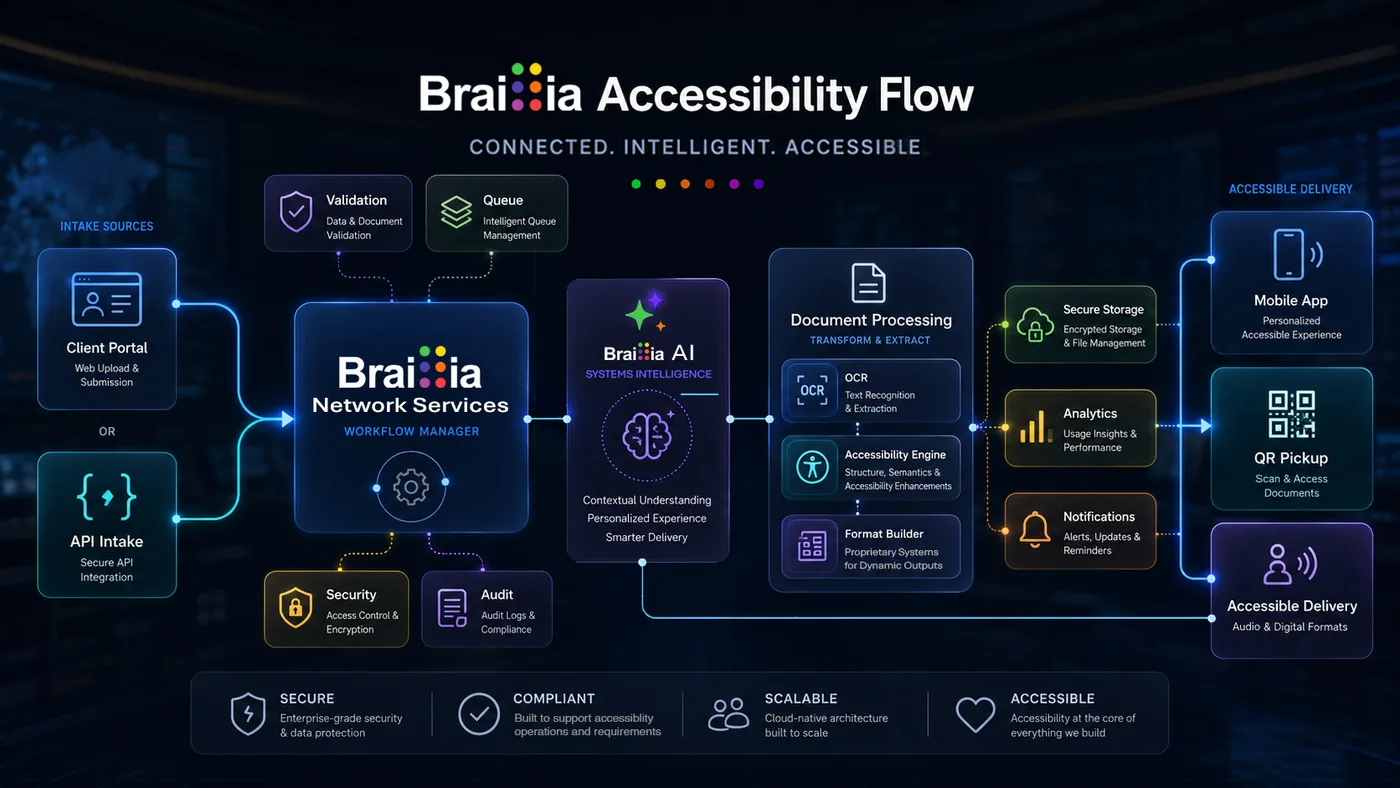
Braillia accessibility flow connecting approved source systems to document processing, accessible outputs, mobile access, and delivery experiences.
Public education accessibility
Braillia helps school districts, public colleges, universities, and education agencies improve access to enrollment information, student forms, accommodation communication, board materials, campus notices, deadlines, and other critical documents while preserving existing student, learning, and communications systems.
Person
A student or family must understand the information and act before an educational opportunity, service, or deadline is missed.
Control
The organization owns the outcome; its platform or provider may control the technology.
First move
Choose one consequential workflow, identify its owner, and prove a usable path.
The access consequence
An inaccessible enrollment packet, student form, accommodation notice, board document, deadline, or campus communication can prevent a person from registering, requesting support, understanding a decision, participating in governance, or completing the next required step independently.
A student or family can be blocked from applying, enrolling, providing required information, selecting services, or meeting an administrative deadline.
An inaccessible notice, instruction, or determination can delay support and force a student to depend on staff to interpret private information.
People can miss a meeting, policy change, safety instruction, payment, appeal, or participation opportunity when the information isn't usable.
The information chain
Accessibility can fail at several points, but a credible implementation begins where the responsible organization or its provider can actually change the information path.
Student, enrollment, learning, accommodation, finance, board, and communications data
SIS, LMS, forms, document, website, notification, and board-management systems
Website, portal, email, app, PDF, print, classroom, office, and family communication
A student, family member, employee, or community participant who needs independent access
Enroll, learn, request support, respond, pay, participate, or meet the deadline
Enter where change is possible
Braillia can work directly with the organization where it owns the information, or through the provider and integrator where the platform controls production and delivery.
Institution-controlled entry
Locally created enrollment packets, accommodation communication, board materials, campus notices, forms, instructions, policies, and selected website documents can establish a focused first workflow.
Primary control
Braillia's role
Assess the access path, transform the selected information into appropriate accessible outputs, preserve the decision and required action, and support an approved delivery experience when the workflow needs it.
Platform-controlled entry
When a student-information, learning, enrollment, forms, board, payment, communications, or portal platform controls the experience, the provider or education integrator belongs in the implementation path.
Primary control
Braillia's role
Define a source-specific accessible-output, embedded-support, or transformation path around the approved education workflow without replacing the institution's system of record.
The credible first workflow
Choose information with a clear institutional owner, timing requirement, and person who must act. Include the responsible provider from the beginning when a student, learning, enrollment, forms, or communications platform controls the source and experience.
Review a Public Education WorkflowThe approval team
Which information creates the greatest delay, dependence on staff, or loss of participation?
Who owns the content, timing, decision, and required student or family action?
Which website, document, form, notice, or public information can the institution control?
Which systems, student data, access, retention, and integration boundaries apply?
Where can accessible output or support enter the existing education workflow?
Evidence for the decision
Give accessibility, operations, IT, security, and procurement the evidence they need before the first implementation decision.
Review current Braillia intake, processing, output, and remediation states.
Open Evidence PackageSee how a source-specific implementation can fit around an existing student, learning, enrollment, forms, or communications system.
Review IntegrationPrepare student-data, access, retention, and implementation questions for a controlled education workflow.
Review SecurityGive accessibility, program, IT, security, and procurement reviewers one shared view of Braillia's public-sector fit.
Open Capability BriefBuyer questions
Government and business teams can begin with one accountable workstream, then expand the operating model only when another accessibility responsibility requires it.
Braillia works around existing systems. An institution can begin with information it controls directly or sponsor a source-specific implementation with the provider that controls the student, family, employee, or public experience.
Begin with one enrollment packet, student form, accommodation communication, board document, campus notice, policy, or deadline-bearing workflow with a named owner and measurable person-centered outcome.
Yes. Appropriate structured outputs can work independently with familiar systems and assistive technology. Braillia delivery and mobile guidance can be added when the institution needs managed delivery or continued support.
Bring Braillia one enrollment packet, student notice, accommodation communication, board document, form, or deadline-bearing instruction. We'll define who controls it, what the person must accomplish, what evidence matters, and where Braillia can enter.